
Posted by Richard G. on Oct 7th 2026
For routine care, how to clean an aviation headset depends on the exact model. Start with its manufacturer care guide, disconnect or power down only as directed, and clean only the surfaces and parts the guide identifies. Keep liquid and debris away from openings, connectors, and microphone components unless the instructions specifically say otherwise, and allow cleaned parts to dry as directed. Cushions and electronic features can differ, so do not assume that a cleaner or technique that works on one headset is safe for another.
.
A practical routine does not need to involve soaking, strong chemicals, or taking the earcups apart. The goal is to remove everyday surface dirt while leaving sensitive parts undisturbed; model-specific directions take priority over general advice, especially for removable cushions and acoustic openings.
Before wiping anything down, identify which surfaces the manufacturer permits you to clean and which areas need to stay dry. That simple check sets up a safer cleaning sequence, including how to deal with dirt near ports without pushing it farther inside.
How to clean an aviation headset without damaging it
A safe cleaning routine starts with the owner's guide for the exact make and model. Headsets differ in their cushions, microphone parts, acoustic openings, and electronics, so do not assume a cleaner or technique approved for one model is safe for another. Keep the manual nearby and treat any unclear instruction as a reason to pause rather than improvise.
- Check the manufacturer's care directions. Find the cleaning and maintenance section for your headset, including directions for the ear cushions, headband, microphone, and earcup openings. Note which components are user-serviceable and whether the manufacturer specifies a particular cleaner or drying method. Do not apply alcohol, disinfectant, or another household product unless the manual approves it for the relevant material.
- Power down and disconnect as directed. Turn off the headset and disconnect it from the aircraft or other equipment before cleaning, following the manufacturer's instructions for batteries or other power sources. Keep liquid away from plugs, cable connections, controls, and openings. Never immerse the headset.
- Remove loose surface dirt without pushing it inward. Work gently and keep debris away from microphone and earcup ports. Do not poke openings with a tool or direct compressed air into them. Bose warns owners of its Aviation Headset X not to force debris into the TriPort openings, blow air into them, or vacuum them. These are model-specific instructions, so follow the port-cleaning procedure for your own headset rather than transferring another model's method. Read the Bose Aviation Headset X owner's guide.
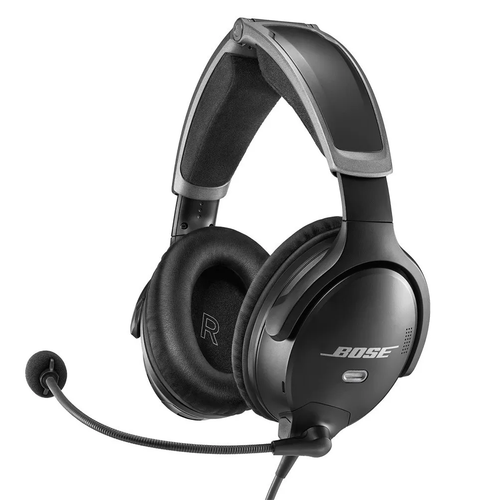
- Wipe only surfaces the guide permits. Use the cloth or cleaning method specified by the manufacturer, applying moisture to the cloth rather than pouring or spraying liquid onto the headset. For the Bose A30, the owner's guide says exterior surfaces may be wiped with a soft cloth dampened with water and mild soap. It also says not to immerse the headset. That guidance is for the A30 and is not a universal recipe. See the Bose A30 owner's guide for its complete care directions.
- Handle cushions and microphone parts separately. Check whether the manual allows removal or cleaning of cushions, covers, or a microphone windscreen. If so, use only its stated method and keep liquid away from components that are not approved for wet cleaning. Do not pull off a part just because it appears removable.
- Let the headset dry as instructed, then inspect it. Allow cleaned surfaces to dry fully before reconnecting or using the headset. Do not use a heater or hair dryer unless the manufacturer specifically permits it. Before flight, inspect the cable and plugs for visible damage, and check that openings are clear using the model's approved procedure. The FAA recommends checking headset cable condition during preflight. FAA headset inspection guidance.
When you need a replacement part or want to confirm model compatibility, start with the manufacturer's instructions and the relevant aviation headsets information.
What should you avoid putting on headset cushions and ports?
Headset cushions and openings sit close to both the wearer and the electronics. So a product that seems harmless on a hard surface may still damage a particular model. Check the care section for the exact headset before applying any liquid or cleaner. Avoid treating alcohol, disinfectant wipes, sprays, or household cleaners as universally safe. Use them only if the manufacturer specifically approves the product and method for your headset materials.
Cushions: avoid soaking and unapproved cleaners
Do not immerse cushions or the headset unless the manufacturer explicitly says that a component is designed for it. Saturated foam or liquid that seeps past a cushion can be difficult to dry fully and may reach parts that are not intended to get wet. Avoid scrubbing, wringing, or using a rough brush on a cushion covering. These actions can stress the material or push moisture and debris farther into the headset.
Cleaning instructions vary by model and by part. For example, Bose's A30 owner guide describes wiping exterior surfaces with a soft cloth dampened with water and mild soap, and warns not to immerse the headset. That is an A30-specific example, not a cleaning recipe for every aviation headset. Check your own manual for approved agents, removable parts, and drying instructions. If it does not clearly authorize a chemical cleaner, do not assume that a product marketed as safe for electronics is suitable for cushions.
Ports and connectors: keep liquids and debris out
Keep cleaning solution away from acoustic openings, microphone ports, electrical connectors, and seams. Do not spray directly onto the headset or push a wet swab, pin, or other object into an opening. A cloth can lift dust from the surrounding exterior, but it should not force particles inward. If debris appears lodged in a port, stop rather than probing it with a tool unless the manufacturer's instructions give a specific procedure for that model.
The Bose A30 guide, for instance, says to keep its earcup openings clear and not to force debris into them, blow air into them, or vacuum them. Those restrictions are specific to the A30 and should not be presented as a substitute for another headset's instructions. If your manual does not explain how to clear a blocked opening, ask the manufacturer or an authorized service provider rather than improvising with compressed air or suction.
Microphone foam: do not treat it like a washable cushion
A microphone windscreen may look removable, but not every foam cover can be washed in place. Avoid pouring or spraying liquid onto the boom microphone, pressing damp foam against its element, or using heat to speed drying. Check whether the manufacturer permits removal and how it should be cleaned or replaced. The Bose A30 guide is one model-specific reference for its windscreen; follow that guidance only for the A30, and consult the manual for other models.
When the permitted cleaning method is unclear, the conservative choice is to keep liquid and chemicals off the part. Let surface moisture dry as directed, and seek model-specific advice before using the headset again.
How should pilots handle odor and shared-use headsets?
When pilots share a headset, use a consistent check between users. Do not assume a wipe or spray will make the equipment safe. Sweat and routine handling can leave moisture and residue on contact surfaces, but headset materials and electronics differ. Follow the care instructions for the exact model before using liquid, cleaner, or a disinfectant; a product suitable for one surface may damage another.
After each use, inspect the ear cushions, headband cushion, microphone windscreen, cable, and visible openings. Remove loose surface debris only as the manufacturer directs, and clean only the approved surfaces. Do not soak cushions, apply fragrance or deodorizing spray, or assume an alcohol wipe is compatible. Avoid putting liquid into microphone openings, earcup ports, connectors, or seams. If the manual permits a damp cloth on a particular surface, use it only there and follow the specified drying instructions. Cleaning a surface is not the same as proving it has been disinfected.
For a flight school or club, make the routine repeatable. Assign headsets where practical. Keep clean units separate from those awaiting care. Let cleaned parts dry as directed before the next use. Do not pass a headset along while a cushion or windscreen is still damp. If users need an additional contact layer, choose only a cover or removable part approved for that headset model. A change in thickness or fit can affect comfort and how the headset sits, so do not improvise with household fabric or adhesive covers.
If odor remains after approved care, inspect removable contact parts and check the manufacturer's guidance. Do not mask the smell with fragrance or stronger chemicals. Some models identify user-replaceable parts, such as cushions or windscreens. That does not make every component removable or establish a replacement schedule for other headsets. Replace only parts approved for the exact headset, and follow the maker's criteria and fitting instructions. If odor persists in a part that is not user-serviceable, ask the manufacturer or an authorized service provider. Do the same if you are unsure whether a cleaner is safe. Do not open the earcup.
Pilots looking for model-specific covers or other options can review Marv Golden's headset accessories and adapters and confirm compatibility before choosing anything. For shared equipment, follow the manufacturer's care directions consistently. Keep surfaces dry as instructed. Do not claim more sanitation than the procedure supports.
How to store your aviation headset after a flight
Disconnect the headset before putting it away. Check the cable jacket for cuts, flat spots, or wear, and inspect plugs for visible damage or grime. Check the cable jacket for cuts, flattened spots, or wear, and inspect plugs for visible damage or grime. The FAA recommends unplugging headset jacks after use to help prevent corrosion, and checking cables during preflight. It also notes that seat rails can damage cables. Look for pinching or abrasion if the cord runs near a seat track (FAA headset inspection guidance).
If the headset needs cleaning, follow the manual for that exact model and let any cleaned or damp parts dry as directed before packing it away. Do not coil the cord tightly around the earcups or stretch it across the headband. Instead, gather it in broad, loose loops without sharp bends, keeping the plug ends from being pulled or crushed. If the manufacturer supplies a cable wrap or storage method, use that guidance. Keep connectors from rubbing against hard objects, and avoid placing heavy gear on top of the headset.
Choose a clean, dry storage place away from direct sunlight, excess heat, and pressure that could deform cushions or strain the cable. A dedicated case or bag can keep the headset separate from tools, kneeboards, and other cockpit items. For ideas on choosing a setup that suits how you carry your gear, see our guide to protective headset storage. A padded single headset bag is another option for keeping one headset protected between flights.
Storage instructions can differ by model, so treat the Bose A30 directions as an example for A30 owners, not a universal rule. The Bose A30 owner's guide says to store the headset in its carry case in a ventilated area away from direct sunlight. It also directs owners to remove the batteries before extended storage. Follow those instructions for an A30, and consult the relevant manual for battery handling and storage guidance on any other headset.
Before the next flight, take the headset out and inspect the cable, plugs, and earcups again. Confirm that the cord is not trapped or twisted and that connectors are ready to use. This quick check helps you notice wear before it becomes a cockpit distraction, while leaving model-specific maintenance decisions to the manufacturer guidance.
When should you replace a headset part or ask for service?
Judge a headset by its condition and operation, then check the manufacturer's guidance for that exact model. There is no single replacement calendar that fits every headset, pilot, and use pattern. A part that looks worn may still be serviceable, while damage or a change in fit or function deserves attention before the next flight.
Look over cushions, the microphone windscreen, cable, and plugs during routine care. Watch for tears, flattening, or other wear that changes comfort or fit. These are prompts to inspect, not universal replacement criteria. Follow your headset's manual for part-specific guidance. If you notice damage, consult the maker before using the headset again.
Notice changes in use, such as a cushion that no longer sits comfortably or seals as intended. Check for a damaged microphone windscreen or unreliable operation. Inspect the cable and plugs for visible wear. The FAA recommends checking headset cables during preflight and notes that seat rails can damage them. A cut or crushed cable needs more than cleaning. Follow the manufacturer's service instructions before relying on the headset. FAA headset inspection guidance
Use the manual to identify user-replaceable items and fit them correctly. Bose lists replaceable parts for its Aviation Headset X, but that list does not apply to every model. Do not open earcups. If a problem persists after approved cleaning or involves electronics, wiring, or unclear performance, contact the manufacturer or an authorized service provider. NIOSH also points to damage or decreased performance as reasons to replace equipment, rather than prescribing one timeline for all users. NIOSH headset care guidance
For a compatible Bose A30, a Bose A30 refresh kit may be one model-specific option when the parts you need match the kit. Confirm compatibility against your headset and its manual before ordering. It is not a general replacement recommendation for other models, and a kit cannot resolve a fault that requires service.
Headset care at a glance
Use this table as a quick reminder, not as a substitute for your headset's care instructions. The Bose A30 examples apply to that model only, not other headsets with similar-looking parts. Before cleaning, identify your exact model and consult its guide, especially for removable cushions, acoustic openings, internal screens, or electronic controls.
| Area or task | Conservative approach | Model-specific caution |
|---|---|---|
| Exterior surfaces | Wipe only the surfaces and materials your headset manual identifies as safe to clean. Keep moisture controlled and away from openings. | The Bose A30 guide allows a soft cloth dampened with water and mild soap for exterior surfaces. It says not to immerse the headset. |
| Earcup openings | Check for visible debris and avoid pushing it into openings. Do not assume that air, suction, or a tool is safe. | The A30 guide says to keep openings clear, not force debris inside, and not blow air into or vacuum them. |
| Microphone windscreen or inner screen | Follow the exact instructions for your microphone parts. Do not remove or clean internal components unless the manufacturer expressly directs you to. | For the A30, follow its directions for the windscreen. If its inner screen becomes damp, the guide says to air-dry it only, without heaters, blowers, or hair dryers. |
| Storage after use | Let cleaned or damp parts dry as directed, then store the headset to protect it from damage. | The A30 guide specifies its carry case in a ventilated area away from direct sunlight, and battery removal for extended storage. |
These distinctions matter because a safe method for one headset can be unsuitable for another. In particular, the A30 guidance about openings, drying, storage, and batteries belongs to its own owner's guide; do not transfer it to a different model without confirmation. The manual also takes precedence over this summary if its wording or diagrams give more specific instructions for a component on your headset.
If you cannot confirm the model or whether a part is user-serviceable, pause before testing a product or tool. Find the label and manual first. Use the maker's service guidance for unclear or damaged parts. This prevents a quick wipe from becoming a problem with an opening, cushion, microphone, or connector.
Source for the A30-specific examples: Bose A30 owner's guide.
Frequently Asked Questions
Can I use alcohol wipes on an aviation headset?
Only if the manufacturer approves alcohol for the exact surfaces and materials on your model. Do not assume a wipe is safe for ear cushions, coatings, microphone parts, or electronics. If the guide does not specifically allow it, use the cleaning method it does recommend instead.
How can I remove a bad odor from headset cushions?
Follow the model's instructions for cleaning its cushions or any removable cover, then let cleaned parts dry fully as directed before reassembly or use. Do not mask the smell with fragrance or apply disinfectant unless the manufacturer permits it. If odor persists, inspect for damage and check the manufacturer's service or replacement guidance.
How do I clean grime from a headset plug or jack?
Disconnect the headset and clean only the exterior surfaces using the method approved by its manufacturer. Do not pour liquid into a connector or insert a sharp tool, swab, or other object into an electrical jack. After use, unplug headset jacks to help prevent corrosion, as the FAA advises (FAA).
What is the safest routine for cleaning a headset without damaging it?
Start with the care guide for your exact model. Use only its approved method for each part. Keep moisture and debris away from openings, and let components dry as instructed. The Bose A30 guide allows wiping its exterior with a soft cloth dampened with water and mild soap. It also says not to immerse the headset (Bose A30 owner's guide). This advice applies only to the A30.
Browse Aviation Headsets and Care Accessories
Care needs can vary by headset model, so checking the options that fit your equipment is a practical next step. Browse Marv Golden's aviation headset selection and explore compatible care accessories. Review product details and manufacturer guidance to make sure any choice suits your headset.